
Integrity
Online proctoring for hiring assessments: what to configure and how to review it
Proctoring is a policy plus a review step. Configure monitoring for the assessment, then read flags, recordings, and answers together before you decide.

Online proctoring is often sold as a switch that “prevents cheating.” In hiring, that framing creates two failures. Teams either over-block honest candidates, or they collect footage they never look at.
A better model is narrower: configure the monitoring the assessment needs, store the evidence with the attempt, and have a person interpret it.
What remote hiring tests actually need
A 20-minute multiple-choice screen and a 90-minute coding round are not the same event. The first is easy to share in a group chat. The second is easier to outsource if identity is weak. The controls should follow that risk.
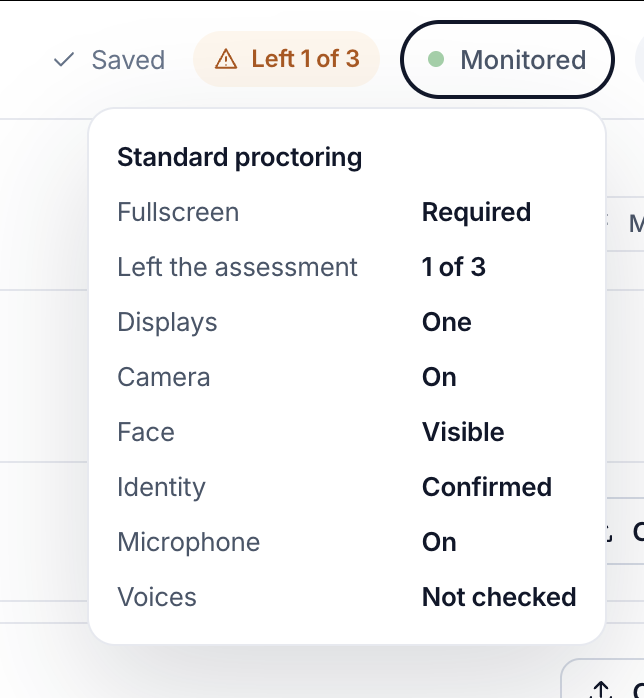
Typical hiring controls include:
- Fullscreen or leave-assessment limits
- Display count
- Camera and face visibility
- Identity confirmation
- Microphone / extra voices
- Browser and screen policies where the plan and format support them
None of these prove intent on their own. A second display flag can be a second monitor used for documentation, or it can be another person. That is why the review belongs next to the answers, not in a separate “security” product.
How to set a policy without theatre
Write the rule in language a candidate can follow.
- Say which devices are allowed.
- Say whether the camera must stay on.
- Say how many times they can leave the test.
- Say what happens if a check fails (pause, flag, or lock), so recruiters are not inventing policy during review.
Then pick a monitoring preset or individual controls that match that text. A policy that is stricter than what you will review is noise. A policy that is weaker than the job’s risk is a gap.
For campus-scale drives, publish the rules on the apply page and in the invite. Surprise monitoring produces support tickets and unfair outcomes.
How Edgeryt Hire handles integrity review
In Edgeryt Hire you configure monitoring for an assessment, then review available integrity flags, recordings, and responses together. The hiring team decides what the evidence means.
That pairing matters. A low coding score with a clean session is a skills issue. A high score with repeated leave-assessment events and an identity mismatch is a review issue. Treating both as “reject” wastes the first candidate and under-reacts to the second.
Related: AI scoring of written answers also requires a human in the loop, and campus hiring drives need a policy candidates see in advance.
Review workflow that scales
- Auto-advance only the attempts that meet score thresholds and have no material flags.
- Queue flagged attempts for a reviewer who can see video, events, and answers on one screen.
- Record a short reason when you override a flag (accessibility, lab environment, false display detection).
- Keep interviewer notes downstream so a later panel does not re-litigate the same clip.
Do not publish customer counts or “cheat catch rates.” You do not have a universal rate, and inventing one is worse than saying nothing.
Adjacent issue: college exams are not hiring tests
Colleges running internal exams and placement mocks have a different operator (faculty, placement cell) and a different candidate (enrolled student). That workflow lives in Edgeryt Campus. Employers should not copy an exam-hall rulebook onto a take-home hiring project.
Questions teams ask
Does a flag mean the candidate cheated?
No. A flag is a prompt to look. Browser events and camera states are evidence, not a verdict.
Can we turn every control on for every test?
You can configure strictly. You then have to review strictly. Unused footage is not integrity.
Is this available on every Hire plan?
Plan limits apply. Check pricing for the current feature set, or ask on a demo.
Next step
Read the Hire overview for how assessments, proctoring, and review sit in one workflow.