
Applications
Branded careers pages and apply flows that candidates actually finish
The apply page is part of hiring operations. Keep it on-brand, short, and connected to the assessment and pipeline for that role.

Candidates abandon apply forms that look like a vendor, ask for information nobody will read, or dump them into a second site for the test. The careers page is not decoration. It is the first operational system of the drive.
What “branded” has to mean
Branded does not mean a marketing microsite. It means:
- The employer name and role copy are what the candidate sees
- The URL can be shared by a TPO or job board
- Fields map to the pipeline, not to a generic CRM dump
- Privacy and terms are present before submit
- The next step (assessment invite, recruiter review) is the same product, not a surprise redirect
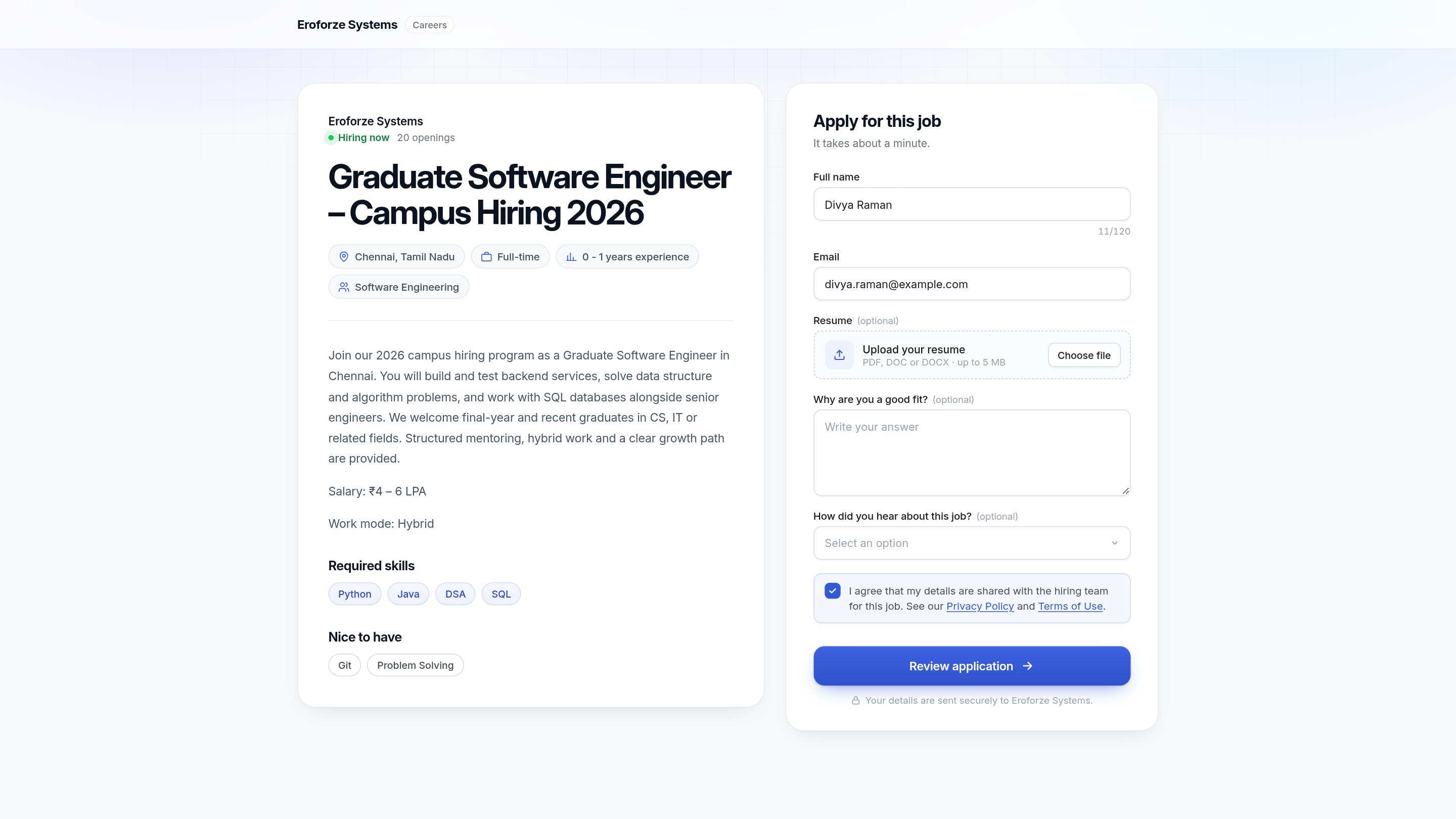
Keep the form to fields you will use
Useful defaults:
- Full name, email
- Resume (PDF / DOC, with a real size limit)
- Optional motivation question
- Source / campus field if coordinators need it
- Explicit consent to share details with the hiring team
Drop fields that only appear because an old ATS required them. Every extra box reduces completion, especially on phones browsing the page — even if the later assessment is desktop-only.
How Edgeryt Hire connects apply to the rest of hiring
Hire lets you create branded application pages and keep candidate information, assessment scores, and stage progression connected to each role. After apply, the same record can carry a skills test, integrity review, and interview scheduling.
That is the difference between a “careers page” and a hiring workflow. The first collects PDFs. The second still has those PDFs when an interviewer joins a Meet.
Related: campus hiring, interview scheduling.
Adjacent area: job-board duplication
If you also post on LinkedIn or a college portal, keep the canonical apply URL as the Hire page. Duplicate Google Forms create duplicate people and no assessment link. If a portal must host a copy, make it redirect.
Accessibility and fairness notes
- Do not require an account before the person can read the role.
- State location, role type, and experience band in the job copy.
- If an assessment follows, say the formats and whether a computer is required.
- Keep consent language specific to this job.
Questions teams ask
Can each role have its own page?
Yes. Separate pages keep fields and assessments from leaking across intern and senior roles.
Can we add custom questions?
Yes — add ones a reviewer will read. Optional written questions are better than mandatory essays nobody scores.
Does this replace our corporate careers site?
It can be the apply destination even if the marketing site links out. The requirement is one pipeline per role.